
ملاحظة: هذا المقال بقلم أحمد بوشفرة. الآراء الواردة تعبر عن الكاتب.
أحمد بوشفرة: مبرمج ومؤلف تقني، أساعد المطورين على بناء تطبيقات ويب حديثة وسريعة.
يمكنك أيضاً نشر مقالك هنا والترويج لخدماتك أمام جمهور من المبرمجين. تواصل معنا
لخص هذا المقال باستخدام ChatGPT
انسخ الأمر أدناه والصقه في ChatGPT للحصول على ملخص سريع للمقال:
لخص لي هذا المقال في نقاط رئيسية: https://www.ahmedbouchefra.com/post-google-form-webhook/
تم النسخ!
In this tutorial, we’ll learn how to create a script for getting Google form submissions programmatically to integrate Google Forms with Webhooks.
If you are familiar with JavaScript, you need to write a Google Apps script and set up a trigger that will be invoked every time we submit the form.
Let’s see this step by step.
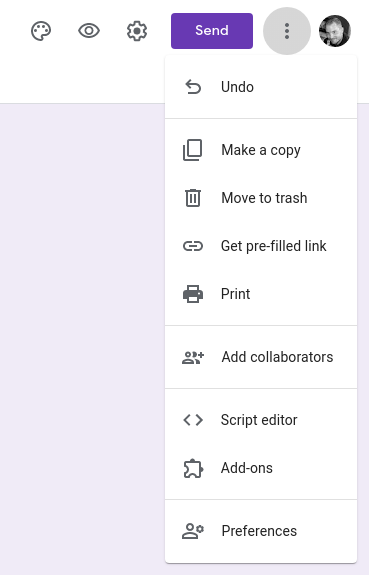
Heab back to your Google form, and click on the three vertical dots in the top right corner and select “Script Editor”.
Next, copy the following script into the editor:
var webhook = "enter your URL here";
function onSubmit(event) {
    const form = FormApp.getActiveForm();
    const allResponses = form.getResponses();
    const latestResponse = allResponses[allResponses.length - 1];
    var res = latestResponse.getItemResponses();
    var data = {};
    for (var i = 0; i < res.length; i++) {
        const qTitle = res[i].getItem().getTitle();
        var qAnswer = res[i].getResponse();
        data[qTitle] = qAnswer;
    }
UrlFetchApp.fetch(webhook, {
        "method": "post",
        "contentType": "application/json",
        "payload": JSON.stringify(data)
    });
};
Make sure to replace, the webhook variable with your own service URL.
Now, this is an important step, to actually get the form submissions; we need to set up a trigger. Click on Edit and select Current Project’s Triggers
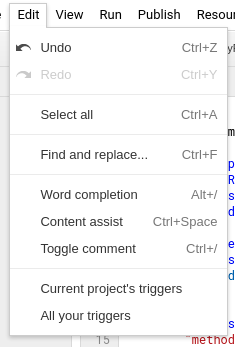
Next, create a new trigger using the Add Trigger button on the bottom right-hand side.
You’ll be presented with the following window:
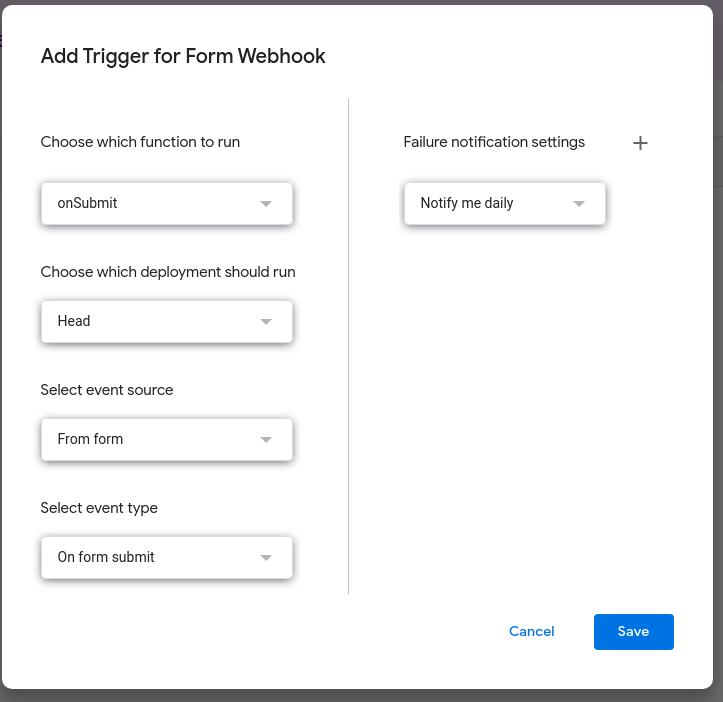
Simply make sure that Select event type is set to On form submit then click Save.
That’s it, if you go and submit your form, you will receive the data as a JSON response.
هل لديك سؤال أو استفسار؟ اترك تعليقاً بالأسفل: